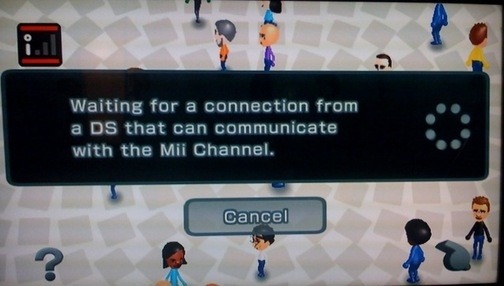

While playing around with Personal Trainer: Walking, Kotaku editors discovered previously unknown Mii Channel Feature: Wii to DS Mii transfers.
Since launch, the Wii has been able to send Miis to Wii Remotes so that the Miis can be transmitted to other Wiis. And Miis have been snaggable via non-Nintendo Mii-editing computer programs.
But Miis hadn’t made it to the DS. They can now that they have a home, as Nintendo informs us that Personal Trainer: Walking is the first DS game/walking-trainer) to support Miis.
On the DS, the Miis are used to demonstrate how far you walked. Like, you know, if you walked about 1000 steps between leaving your apartment this morning and getting to your downtown Manhattan office ’ with the help of the subway.
Personal Trainer: Walking is the first DS title to make use of the Nintendo Mii characters, and will include a pedometer to track the players walking – encouraging players to reach 3000 steps per day.
Considering how infrequent Mii use is on a lot of Wii titles, are you interested in transfering your Mii characters to your DS? Let us know in the comments!
Argh, the only compelling thing about the feature is the feature. Yea, I want to see for myself how the Mii looks like on my DS, other than that, there's no realm reason for me to care.
That's not too bad actually, this seems pretty minimal but it's cool that you could associate your Mii with multiple systems.
Actually, that connectivity has been around for almost a year and a half. I've been able to search for DS systems that can connect to the Wii for about 7 months. Simply hold 1, 2, A, and B at the same time on the Wii Remote and eventually that'll pop up on your screen. Then a button in the shape of the DS will be permanently displayed on the Mii menu.
The button combo may be different than what I said, but the results are the same.
I'd like to use my Mii as my avatar on the Wii and DS no matter which game. I was pissed when they didn't make the playable characters in Brawl. They could've been like the Fighting Polygons.
to Lite (on a crappy PC!!) (Sorry about the fact that you are on a PC)
OK, the actual manip is: press 1, press 2, press A and press B and hold.
It is a in a series: so 1, then 2, then, A, then B and hold.
@ ???
I live for the day where I can change my name to Lite (on a kickass Mac!!)
I'm still waiting for an actual use for the Mii's. They aren't that great in Mario Kart Wii, and about the only thing they are used for is Wii Sports.